
What Is Website Maintenance?
A solid website maintenance checklist is essential for South Wales businesses that want their sites to stay fast, secure, and visible online.
Website maintenance is the ongoing process of keeping your website secure, up to date, fast, and error-free. It covers software updates (CMS, themes, plugins), backups, performance tuning, security checks, broken link fixes, analytics reviews, and renewals (domain, SSL, licences).
For local businesses across South Wales — from Cardiff to Abergavenny — consistent maintenance protects revenue, SEO visibility, and customer trust.
Why Regular Maintenance Matters (Security, SEO, UX)
– Security: Patch vulnerabilities before attackers find them. Keep firewalls, plugins, and PHP up to date; review logs and alerts.
– SEO: Google rewards healthy sites. Fix crawl errors, monitor Search Console, and keep content fresh to maintain rankings.
– UX & Conversions: Faster, cleaner sites convert better. Reduce friction by testing forms, checkouts, and accessibility.
– Risk Reduction: Verified backups + recovery drills reduce downtime and panic when something breaks.
How to Use This Checklist
Use the cadence that follows (Daily → Weekly → Monthly → Quarterly → Annual). Assign an owner, set calendar reminders, and track completion in a shared checklist. For higher-risk sites (eCommerce, bookings, membership), tighten the cadence (e.g., move some monthly tasks to weekly).
Daily Maintenance Tasks
Check Uptime & Site Accessibility
Confirm the site is reachable and loads without obvious errors. If you use an uptime monitor, review alerts and resolve anomalies quickly.
Monitor Security Alerts (Firewall/Plugin)
Glance at your WAF (web application firewall) or security plugin dashboard. Investigate unexpected spikes in blocked requests, brute-force attempts, or changed files.
Scan for Critical Errors
Skim application/server error logs for new critical entries. Rapid fixes prevent small issues from becoming outages.
Weekly Maintenance Tasks
Update CMS, Themes & Plugins (on Staging First)
– Create/update a staging site.
– Apply updates on staging and smoke-test key journeys (home → service → contact, or product → cart → checkout).
– Push to live after tests pass. Remove unused plugins to reduce attack surface.
Verify Backups & Review Logs
– Confirm automated backups ran (files + database).
– Perform a test restore quarterly (see below), but weekly verify backup integrity and retention (e.g., 14–30 days).
– Maintain off-site backups (separate provider/storage).
Test Forms & Key User Journeys
– Submit each form (contact, quote, newsletter).
– Check recipients received notifications.
– For eCommerce, run a test order in Cardiff or Abergavenny shipping profiles if applicable.
Quick Performance Spot-Check
Run a light performance check (homepage and a key landing page). Identify regressions early instead of once a quarter.
Monthly Maintenance Tasks
Test Page Speed & Core Web Vitals
Measure LCP (Largest Contentful Paint), INP (Interaction to Next Paint), and CLS (Cumulative Layout Shift). Address:
– Image sizing/compression, font loading, and lazy-loading.
– Unused scripts/styles, render-blocking resources, oversized hero media.
Track trends — not just a single score.
Audit Broken Links & Redirects
– Crawl for 404s and fix or redirect to the most relevant page (use 301 redirects).
– Fix internal links pointing to redirected URLs to reduce hop-chains.
– Validate canonical URLs on key pages.
Review GA4 & Search Console
– GA4: Review engagement metrics and conversions; compare month-on-month.
– Search Console: Fix crawl errors, monitor coverage, and review queries/pages gaining traction.
– Identify pages needing content refreshes (low CTR, position 5–15).
Content & On-Page Updates
– Refresh service pages with clearer value, new case studies, and FAQs.
– Add internal links from new content to your core Website Maintenance page for topical depth.
– Localise references (e.g., examples from South Wales, customer stories in Cardiff).
Accessibility & Visual QA
– Check headings order (H1 → H2 → H3), alt text, focus states, and contrast.
– Test key flows with keyboard only.
Quarterly Maintenance Tasks
Review Hosting, Server & PHP Version
– Update to supported PHP versions.
– Check CPU/RAM/disk utilisation; consider upgrading plans or enabling a CDN.
– Renew/optimise caching strategy (object/page cache) and purge policies.
Test Disaster Recovery (Restore Drill)
– Restore the latest backup to a staging environment.
– Document restore steps and timing.
– Confirm media, URLs, and logins work post-restore.
Deep Security Sweep
– Run a malware scan; rotate admin passwords; remove dormant accounts.
– Review file permissions and disallow file editing in production.
– Validate SSL configuration and HSTS.
Forms, Checkout & Integrations QA
– Test third-party integrations (CRMs, payment gateways, marketing tools).
– Ensure webhooks, API keys, and permissions haven’t expired.
Technical SEO Pass
– Re-generate XML sitemaps and resubmit if structure changed.
– Validate schema (e.g., FAQ, Article, LocalBusiness where appropriate).
– Reassess canonical strategy for pagination/variants.
Annual Maintenance Tasks
Renew Domain, SSL & Licences
– Calendar licence renewals (plugins, themes, CDN, monitoring).
– Ensure SSL auto-renew works and alerts are enabled.
Full Site Audit & Content Cleanup
– Prune thin/outdated posts; merge duplicates; redirect legacy URLs.
– Refresh cornerstone content with new stats and case studies from South Wales clients.
Governance & Documentation
– Update your maintenance SOPs, access lists, and role assignments.
– Reconfirm data retention and privacy policies (GDPR).
Recommended Tools & Automations (Build Your Stack)
Uptime & Incident
– 24/7 monitors + multi-channel alerts. Add root-cause notes to a logbook so patterns emerge.
Security & WAF
– WAF + malware scanning + brute-force throttling. Enable 2FA for all admins.
Backups
– Automated, daily (or more frequent for eCommerce). Retain off-site copies; test restores quarterly.
Performance
– Caching, image optimisation, and scheduled Lighthouse checks.
– Track Core Web Vitals over time.
Reporting
– Monthly dashboard blending GA4 + Search Console + uptime + tasks completed.
– Share highlights with stakeholders (what improved, what’s next).
To Do Checklist
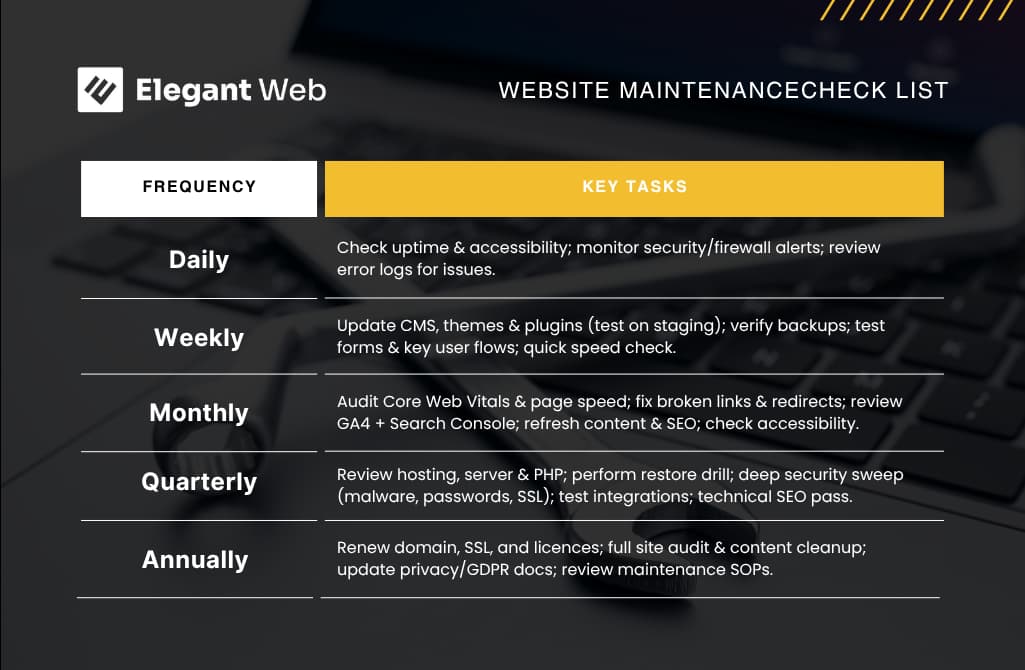
– Daily: Uptime, security alerts, critical errors
– Weekly: Staging updates, verify backups, test forms/journeys, quick speed check
– Monthly: Core Web Vitals, broken links/redirects, GA4 & Search Console review, on-page refresh, accessibility spot-check
– Quarterly: Server/PHP review, restore drill, deep security sweep, integrations QA, technical SEO pass
– Annual: Renewals (domain/SSL/licences), full site audit & cleanup, governance updates